

…or whatever remains of it?
Yeah.
I finally found what I was searching for, usage of RW media similar to DVD-RAM. Only to find it’s been removed from Linux Kernel: https://www.phoronix.com/news/Linux-To-Remove-pktcdvd
Worry not, something remains: https://www.kernel.org/doc/html/v6.1/cdrom/packet-writing.html
According to the DVD+RW specification, a drive supporting DVD+RW discs shall implement “true random writes with 2KB granularity”, which means that it should be possible to put any filesystem with a block size >= 2KB on such a disc.
And indeed, with DVD+RW disc, I can just do so. Even if it’s really sub-optimal.
However, some drives don’t follow the specification and expect the host to perform aligned writes at 32KB boundaries. Other drives do follow the specification, but suffer bad performance problems if the writes are not 32KB aligned.
Anyway…
ext4 on DVD
So, yes. After initial format, I can just
mkfs.ext4 -b 2048 /dev/sr0
Might have been a coincidence as I just used an old disc and failing drive, but trying block size of 4096B made formatting extremely slow. No wonder, after inspecting the disc, it was clear the formatting fully re-wrote it, which didn’t happen with 2048B BS.
tar
That worked as well. Exact command I used:
tar -vcf /dev/sr0 -b 4 files/
I am not sure if my setting for blocking factor made any sense whatsoever. I didn’t retry this. As I said, old disc and drive. It would work in bursts, then get stuck for a long time. Writing ~500MB took roughly an hour.
Reading it worked well though.
Who needs an FS when you have tar.
Partition table on DVD - where the dreams fall apart
fdisk /dev/sr0
That… worked. I created GPT and added 2 partitions. After writing the changes, I reinserted the disc.
Aaaaaand… nothing.
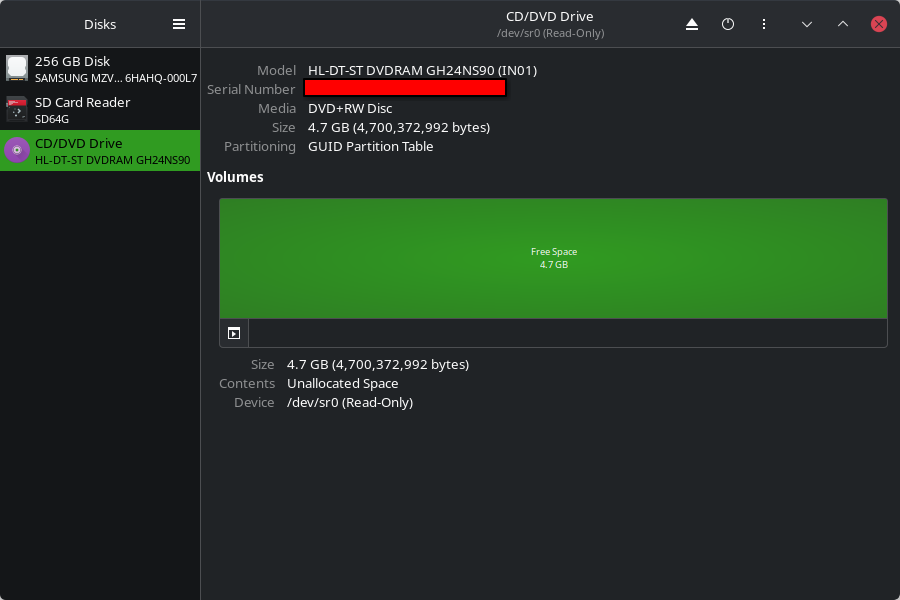
You can see that there is indeed a GPT on that DVD+RW, which feels crazy. But, where are my partitions?
Looking in /dev, I found no mention of partitions.
ls /dev/sr0*
/dev/sr0
Let’s check fdisk again:
fdisk -l /dev/sr0
Disk /dev/sr0: 4.38 GiB, 4700372992 bytes, 2295104 sectors
Disk model: DVDRAM GH24NS90
Units: sectors of 1 * 2048 = 2048 bytes
Sector size (logical/physical): 2048 bytes / 2048 bytes
I/O size (minimum/optimal): 2048 bytes / 2048 bytes
Disklabel type: gpt
Disk identifier: 6AE020A5-1F51-46A6-8741-C28915AF6208

Device      Start     End Sectors  Size Type
/dev/sr0p1    512  524799  524288    1G Microsoft basic data
/dev/sr0p2 524800 2294783 1769984  3.4G Linux filesystem
Hmmm. I didn’t use root, so I got a hint from fdisk. I did re-insert the disc, so it should’ve been irrelevant now, but at least it pointed me to a potentially useful command.
# The kernel still uses the old table. The new table will be used at the next reboot or after you run partprobe(8) or partx(8).

sudo partx -av /dev/sr0
partition: none, disk: /dev/sr0, lower: 0, upper: 0
/dev/sr0: partition table type 'gpt' detected
range recount: max partno=2, lower=0, upper=0
partx: /dev/sr0: adding partition #1 failed: Invalid argument
partx: /dev/sr0: adding partition #2 failed: Invalid argument
partx: /dev/sr0: error adding partitions 1-2
Invalid argument?
Does it mean I can’t load a partition table from a DVD?
LVM to the rescue? (no)
Short answer in this case:
sudo pvcreate -v /dev/sr0
  Cannot use /dev/sr0: device type is unknown
Finally at last, a disc directly playable with aplay
Obviously, I can write bytes to the disc, so this isn’t special. But it feels cool.
I find it unfortunate that I can’t simply take data of audio CD, playing it with aplay. But now I can at least do so with a DVD.
ffmpeg -i Stan\ LePard\ -\ Velkommen\ \(1996\).wav -f s16le -acodec pcm_s16le -ar 44100 -ac 2 tmp/velkommen.raw
And writing with dd
dd if=tmp/velkommen.raw bs=2048 status=progress of=/dev/sr0
57145344 bytes (57 MB, 54 MiB) copied, 16 s, 3.6 MB/s
27930+0 records in
27930+0 records out
57200640 bytes (57 MB, 55 MiB) copied, 33.49 s, 1.7 MB/s
It might be good to know this got stuck the first time at the end. So I used truncate to pad it with zeros to a multiple of 2KiB. Again, might have been a coincidence (sample size 2).
And finally, the dream is achieved:
aplay -f cd /dev/sr0
Playing raw data '/dev/sr0' : Signed 16 bit Little Endian, Rate 44100 Hz, Stereo
Now I could perhaps try to make a script/program which would take list of files, convert them to raw PCM, record track byte offsets and other data (like track title), concatenate the audio, add the info data in some specific format, and also have a program/script to read the info and play the tracks!
Re-inventing the wheel disc.
that’s a wheely nice disc-ussion of your problem
You might be able to use loop-mounting (man losetup) to make the kernel forget about the device type, and treat the disc as a different kind of drive. It’s likely not going to work, but it’s worth trying. If you know programming and you are searching for a new rabbit hole, you can also look into fuse and write your own filesystem. It might be fun with a dvd+rw!
Yeah, I already tried losetup unsuccessfully, but thanks anyway.
I don’t know what I did wrong, but now it works with
losetup.
So that would be solved.Thanks for the answer and for updating the post!
Wonder if you use kpartx to read the partition table instead of having the kernel do it if you’d have more luck?



![[SOLVED - losetup] How could I make Linux acknowledge partitions on something that shouldn't have them? | Messing with packet writing on RW optical discs (or whatever remains of it)](https://files.catbox.moe/zhn6y4.png)